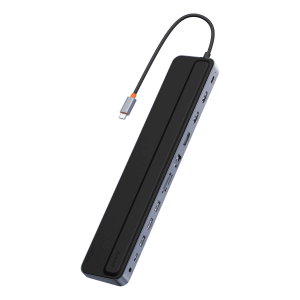
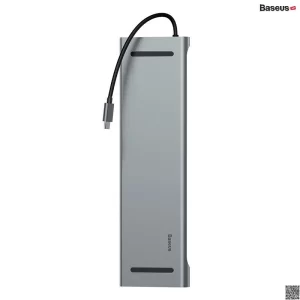
Baseus 17-in-1 USB C Docking Station to Cast on 3 Monitors
-
17-in-1 Docking Station — Up to 16 ports allowing you to connect almost all devices through a single gear; 3 4K HDMI ports to cast different content on each display, PD Type-C to connect mobile devices, 3 USB 3.0 ports, 2 USB2.0 ports. Note: Docking station requires a second power adapter through the PD USB-C port when charging your laptop through it
-
Triple Extend to the Fullest — Boost productivity by casting up to 3 different contents on displays; Actual pixels up to 4K@30Hz when using a single HDMI port, 1080P@60Hz when using 2 or 3 in Windows system. Enjoy efficient data transfer and fast charging through all high speed ports. Note: MacOS DOES NOT support MST mode, all 3 display peripherals will mirror the desktop interface
-
Fast Transmission & Stable Network— 3 USB3.0 ports offering a data transfer speed going up to 5Gbps for smartphones, tablets, flash drive, hard drive and any compatible external storage; 2*USB 2.0 ports for keyboard and mouse; built-in SD and TF cards reader to easily import export files in memory card from different devices; 1000Mbps internet LAN port ensuring a fast and stable network connection (backward compatible with 1000/100/10Mbps)
-
Broad Compatibility — Compatible laptops with USB-C port(support Power Delivery+DisplayPort+Date Transfer), including Google Chromebook Pixel, Google Pixelbook Pen, Dell XPS13/15, G3/G5/G7, HP Pavilion X2, Lenovo, MacBook Pro/Air and more; compatible with “DP Alt Mode” of Samsung Galaxy S10/S10 plus, S9/S9 Plus, S8/S8 Plus, and Huawei’s flagship series
-
Smart and Safe — The built-in Baseus VL817 master chip ensures all 17 ports works properly and offers protection against overheat.
Product description
Baseus 17-in-1 USB C Docking Station to Cast on 3 Monitors
Exclusively at xcessorieshub.com
Notes:
- Ensure that your laptop’s USB-C port supports PD Power Delivery, DP Alt Mode and Data Transfer. Otherwise, some interface functions of the docking station can‘t be used. Consult your laptop’s manual or contact the manufacturer for this information.(The Laptop has USB-C 3.1 Gen 2 / USB-C 3.2 Gen 2 port support power deliver, hdmi output and 10Gb/s data transfer. The USB-C 3.1 Gen 1 port: 5Gb/s (data transfer only) can’t support hdmi display.)
- Must connect the USB-C port of the laptop to docking station through the equipped USB C to C Cable(supports PD Power Delivery, DP Alt Mode and Data Transfer).
- If you need to charge the laptop, it is recommended to connect an external charger with a power>65W through the “PD” port of the docking station, such as 65W, 87W, or 100W charger.
- To ensure a stable casting or mirroring experience, use the same model of monitor as connecting to 3 different screen display may cause your laptop to misread monitors information and may result into displaying content abnormally.
- This docking station supports up to 4K@30Hz. The final output depends on the maximum output resolution supported by your laptop’s graphic card and screen display you use.
- Mac OS does not support multi-screen display, only supports expansion of one screen at most.
- Avoid using it continuously connected to the power supply 24 hours a day for a week, as this may cause product failure. Please cut off the power supply when the product is not in use, and try not to place the product near the heat exhaust port of the connected device during use.
Interface Description
- PD USB-C Ports: Supports up to 100W fast charging; requires a 60 to 100W PD charger to power or recharge your laptop through this docking station.
- To Host Port: Dedicated to connect your laptop and this docking station with the included USB-C to C cable.
- 3 HDMI ports: Each port individually supports up to 4K@30Hz on a qualified screen display, and 1080P@60Hz when casting or mirroring on 2 displays, ignoring the top resolution they support.
- 3*USB 3.0 ports: Support USB3.0 Gen1 devices, and with data transfer speed up to 5Gbps.
- 2*USB 2.0 ports: Support USB 2.0 devices, and with data transfer speed up to 480 Mbps.
- 2* USB-C ports: Support USB-C devices, and with data transfer speed up to 5Gbps.
- SD/TF Card Reader: Supports SD/TF cards up to 2TB (reading two cards at once is not supported)
- 3.5 mm Audio Port: For wired headphones and microphones.
- DC 12V Adapter: The 36W DC power adapter is exclusively designed to power the docking station in order to ensure all ports works properly. DO NOT use it to power any other devices.
- RJ45 LAN port: For stable and fast network connection, backward compatible with 10M/ 100M/ 1000Mbps. Internet connection automatically adjusts to the optimal level on Windows system. On MacOS, go to System Preference → Network, click on the “+” icon to create a new service, select USB 10/100/1000 LAN → Create → Apply, then your MacBook is granted the access to wired network connection.
Please use the equipped usb-c to usb-c cable or other usb c to c cable with full-featured mode.
√Equipped full-featured usb-c to usb-c cable support Data transmission, charging and video signal output.
×Normal usb c cable does not support video signal output.
×It is not recommended to use an extra adapter to connect the laptop’s USB C port to the docking station.
About Casting or Mirroring on 3 Screen Displays (Mac OS does not support multi-screen display)
About Triple Display(DP1.4)
- Settings on Windows OS : Since the Intel Control Panel only supports casting 3 interfaces, 1 of the 3 displays or your laptop’s screen will have no signal when connecting 3 displays to this docking station
- Settings on MacOS: Go to: About this Mac – Display – Display Preferences – Mirror Display, then uncheck to enable extended mode. As MacOS does not support MST mode, you will only be able to mirror your desktop interface on 3 screen displays.
The version of DP on your device directly determines the actual resolution when connecting to external monitors using the docking station
- If you’re using a Windows device, you can know which version of DP you have by checking your CPU generation.
- DP version 1.2 if your CPU is Intel generation 10 or earlier.
- DP version 1.4 if your CPU is Intel generation 11 or later.
- DP version 1.4 if you’re using a workstation laptop with an NVIDIA GPU.
- If you’re using a MacBook, iMac, or iPad, you can find your DP version from the list below:
- DP 1.4: iPad Pro (3rd generation and later), MacBook Pro ( 2017, 2019, 2020, 2021), MacBook Air (2020), MacBook Air (13-inch, M1, 2020), iMac (2017 and later), iMac Pro (2017 and later)
- DP 1.2: iPad Air (4th generation), MacBook Air (2018), MacBook Pro (2016), Mac mini (2018)
Compatible Devices (not full list)
| For Apple: | MacBook/ MacBook Pro(2021/2020/2019/2018); Macbook Air 2018-2020, Mac mini 2018-2020, iPad Pro/Air 2018/2020, iPad mini 6 |
| For Dell: | Dell XPS 9380/ XPS 13 9365/ XPS 15 2018/ XPS 13 9300; Dell Latitude 5290 2 in 1/5285/5480/5490/5580/7280/Dell Latitude E7370/E7470/E7480/E7490/ Latitude 13 7000/E7370L/New XPS 15 i7 |
| For Lenovo: | Lenovo Yoga 720-13IKB/ Yoga 730/ Yoga 900-13ISK/ Yoga 910/ Yoga 920/ Yoga 930/ Yoga 940-14IIL; 3rd generation Thinkpad Yoga; Yoga15 Thinkpad Ultrabook Pro; Thinkpad E590/ Thinkpad P72/ Thinkpad T470/ Thinkpad X1 Carbon (2019 model); Lenovo C930/ T480s/ X390/ 81N8 |
| For Surface: | Microsoft Surface Book 2/ Surface Laptop 3; Surface Pro 7/Surface Pro 8/Surface Go |
| For Samsung: | Samsung Galaxy S10+/S10/S9+ /S9 /S8+ /S8 Plus; Note 10/9/8; Galaxy Book Flex Alpha 2-in-1 13.3″ QLED Touch-Screen Laptop; Galaxy Tab S5e/ Galaxy Tab S4; Galaxy S20 Ultra |
| For HP: | HP Spectre Laptop 13-af001TU/ Spectre x360 13t/ Spectre folio (13t-ak000cto)/ Spectre 360 laptop/ Specter x369; Elitebook 840 G5 series/ Elitebook X2/ Elitebook x360 1030 G3/ Elitebook 745 G6/ Elitebook 830 G6/ 2018 HP Elite 800 G4; Envy Geforce mx250/ Envy x360 Laptop (15z-ds100); Z book 15u G3/ Zbook 17 G4 |
| For ASUS: | 13” ASUS Zenbook UX330UA/ Zenbook Flip ux370u; ASUS TUF Gaming A15 Gaming Laptop |
| For Acer: | D17w3 Aspire c24-865 |
| For Games: | Steam Deck; ROG Ally |
| Other Laptops: | Google Slate (2019); SanDisk Cruise Glide; Razer Blade 2017 (gtx 1060); Pixel book go 2019/2020, Google Chromebook Pixel Book; 13” ASUS Zenbook UX330UA; LG G5, LG gram 14Z990-V.AA52C |
| Not compatible Devices | Huawei matebookd15 / Lenovo Yoga 6 / Lenovo ideapad 320s / Ideapad S145-15IWL / Lenovo e590 / Acer Nitro 5 AN515 / Acer Aspire 5 a515-44-r1bu |
Incompatible Devices
| For Samsung: | Samsung Galaxy A20 / A20E / A50 / A70 / A80 / S6 / S7 / J6 / J7 / M20 / M30; Samsung Galaxy Tab A / 10.1 / 10.5 / S3; |
| For LG: | LG Google Nexus 5X/6P, LG Stylist/LG G6,LG V30, LG k10/k20. |
| For Acer: | Acer Aspire A717-72G,Acer Aspire A515-44-R1DM, Acer Aspire a515-54 model |
| For HP: | HP14s-be102TX, HP Probook 650 G2, HP Probook 455 G4, HP Pavilion-14 bf116tx, HP 14-ce1004TX 14, HP Elitebook 820 G3, HP Pavilion 15 ck009, HP EliteBook 745 G4, HP Pavilion Power Laptop 15-cb, HP Probook 430 G5, HP EliteBook 828 G4, HP Pavilion 15-cs3000, HP Pavillion Laptop Model 15-cs1014-ng, HP probook g3, HP bs049dx |
| Others: | Predator Helios 300 PH315-52-754M, Microsoft Surface Pro 6, Oneplus 2/3/3T/5T/6T; All Motorola’s phone; GoPro; Amazon Fire Tablet; Surface Dock 2; |
Buy the Baseus 17-in-1 USB-C Docking Station in Pakistan
Running out of ports on your modern laptop, and need to drive multiple screens reliably? Buy the Baseus 17-in-1 USB-C Docking Station is the ultimate solution, instantly transforming a single USB-C port into a powerful command centre capable of supporting a multi-monitor setup and connecting all your essential peripherals at once.
Key Features: What 17 Ports Really Mean
This docking station is a powerhouse, built to handle every connection your professional or creative life demands, and here are the highlights:
- Connectivity: Massive 17-port capacity, including multiple USB 3.0, USB 2.0, Ethernet, and audio jacks.
- Video Output: Support for triple display support via HDMI and DisplayPort, ideal for complex design work.
- Power Delivery: Pass-through charging capability to power your laptop while connected.
- Transfer Speed: USB $3.0$ ports offer rapid, high-speed data transfer for large files.
- Network: Gigabit Ethernet port ensures stable and fast wired internet access.
- Build: Durable aluminium casing designed for passive cooling and long-term desktop workspace expansion.
Why Buy the Baseus 17-in-1 USB-C Docking Station?
It feels incredibly sturdy; the aluminium casing gives it a necessary heft and ensures it stays cool even when driving three monitors and transferring data simultaneously. This build quality is a major reason to buy the Baseus 17-in-1 USB-C Docking Station. It’s built to sit firmly on your desk, and frankly, its size is manageable considering how many ports it offers. It’s a clean, industrial look that won’t clutter your space.
The genuine benefit here is reclaiming your productivity. You simply plug in one cable and suddenly you have a fully expanded workstation, eliminating the need to fumble with separate adapters every time you sit down. For professionals relying on this kind of infrastructure, choosing Xcessories Hub guarantees you the official unit, ensuring you have the original Baseus 17-in-1 USB-C docking station in Pakistan with full warranty support.
Performance and Usage: Driving Your Digital Workflow
The core function of this dock is pure, uninterrupted throughput. It excels at providing the bandwidth needed for a seamless experience when running a demanding laptop connectivity hub. This is the key performance aspect that convinces people to buy the Baseus 17-in-1 USB-C Docking Station. You can push the limits, running a video conference on one screen, editing a document on another, and monitoring your email on a third, all while simultaneously backing up files to an external drive.
If you happen to be connecting a high-refresh monitor, like the Xiaomi 2K Gaming Monitor G27Qi, you’ll appreciate the dock’s robust video handling. We strongly suggest using a dedicated cable like the CHOETECH 4K@60Hz USB-C to HDMI Cable if you ever need a direct connection to a single screen, just for comparison.
Can I Get the Best Baseus 17-in-1 USB-C Docking Station?
Considering the sheer volume of high-speed ports and the essential triple display output, the Baseus 17-in-1 USB-C Docking Station price in Pakistan offers immense savings compared to buying numerous smaller hubs. If your workflow requires the very best in terms of single-cable expansion, this model is undeniably the best Baseus 17-in-1 USB-C docking Station available. It provides professional-grade function at a reasonable cost.
Power Management and Compatibility Tips
Proper power delivery is critical with any powerful hub. Ensure your laptop’s USB-C power adapter is plugged into the dock’s PD input; the dock intelligently handles the charging split. You can even use the dock’s USB ports for low-power needs, perhaps to plug in the Anker Nano Powerbank 5000mAh for charging it while you work. For users who prefer a dedicated, fast wireless charging pad at their desk, we also stock the Samsung Super Fast Wireless Charger as a separate accessory.
Ready To Buy the Baseus 17-in-1 USB-C Docking Station
This docking station isn’t merely an accessory; it’s the critical foundation for a truly efficient multi-monitor setup. It makes the jump to a complex, multi-screen workspace simple. You can trust Xcessories Hub to handle your order with care, providing quick delivery across the country. Ready to instantly expand your productivity? Buy the Baseus 17-in-1 USB-C Docking Station today and get fast delivery anywhere in Pakistan.
Baseus 17-in-1 USB C Docking Station to Cast on 3 Monitors price in Pakistan
Baseus 17-in-1 USB C Docking Station to Cast on 3 Monitors is listed by xcessorieshub.com at Rs. 37,999. It is currently out of stock as of October 26, 2026. The store lists a regular price of Rs. 39,999, a reduction of 5%. At Rs. 37,999, this listing is among the highest-priced in the category (median for USB Hubs & Docking Stations on Asli Products: Rs. 6,500). Browse more USB Hubs & Docking Stations or Baseus products to compare prices.